
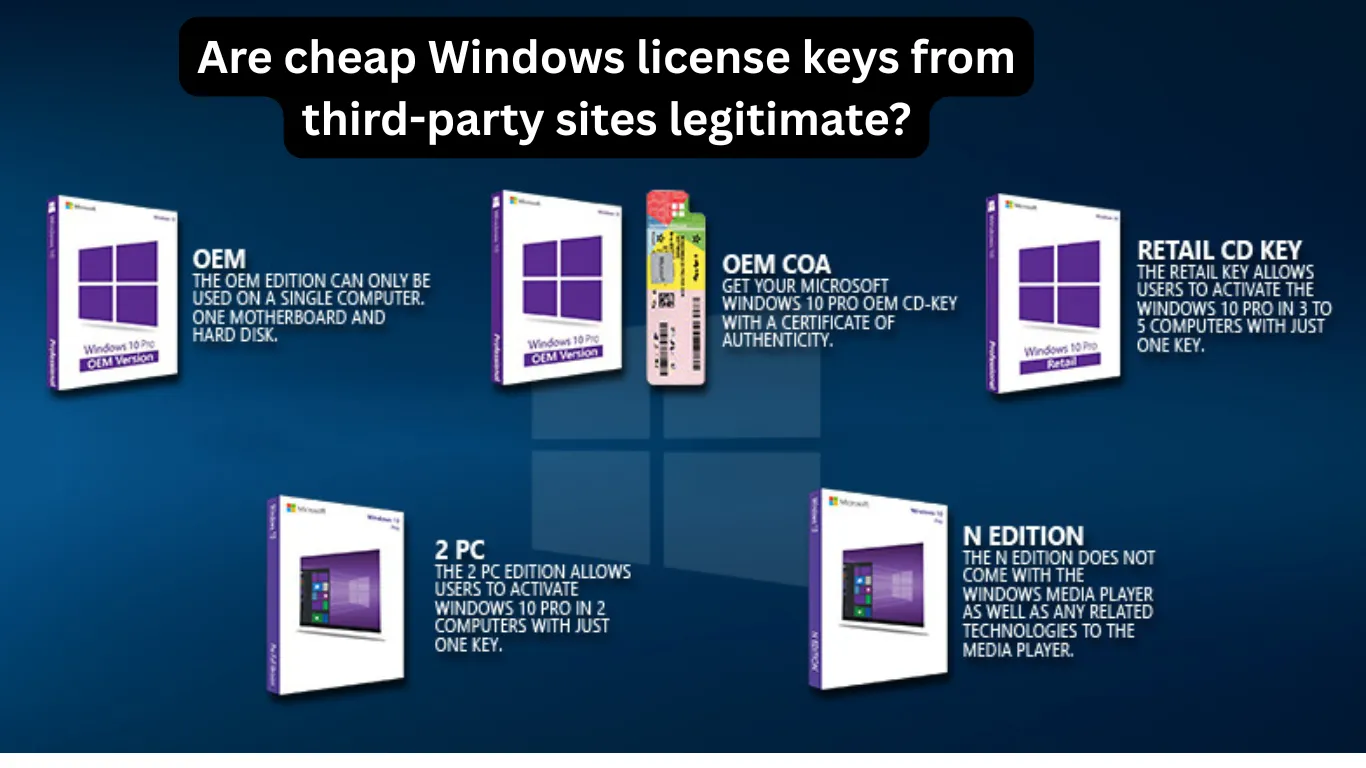
Cheap Windows license keys are everywhere online. From marketplace sellers to unknown software websites offering Windows 11 Pro for just a few dollars, the deals can seem too good to ignore. But are these low-cost activation keys actually legitimate, or are buyers risking deactivation, malware, or even legal trouble?
If you have ever searched for discounted Windows licenses, you are not alone. Many PC builders, gamers, students, and business users look for cheaper alternatives to Microsoft’s official pricing. However, understanding where these keys come from is essential before you spend your money.
In this guide, we will explain how cheap Windows keys work, whether they are legal, common problems users experience after activation, and how to safely activate Windows 11 in 2026.
Why Are Some Windows License Keys So Cheap?
Microsoft officially sells Windows 11 Home and Pro licenses at premium prices. Yet many third-party sites advertise keys for a fraction of the cost.
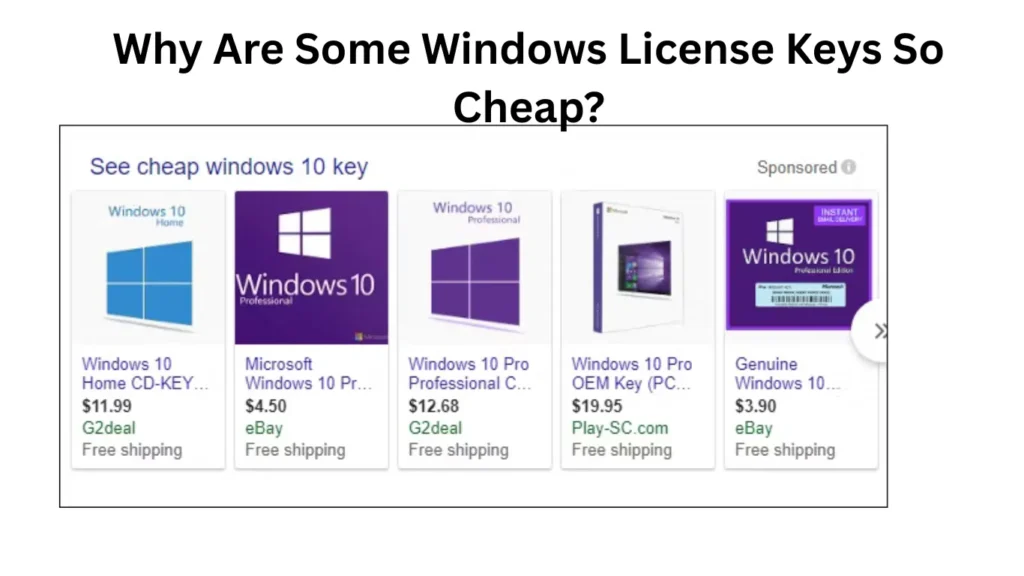
There are several reasons why this happens:
1. OEM Keys
OEM (Original Equipment Manufacturer) keys are designed for PC manufacturers. These licenses are cheaper because they are tied to one device and usually cannot be transferred.
Some third-party sellers resell unused OEM keys from bulk purchases.
2. Volume Licensing
Businesses often buy Windows licenses in bulk. Occasionally, unused or improperly distributed volume license keys end up on resale websites.
These keys may work temporarily but could later be blocked by Microsoft.
3. Regional Price Differences
Certain sellers exploit lower software pricing in different countries. They buy cheaper regional licenses and resell them internationally.
While activation may work initially, the legality can be questionable.
4. Stolen or Unauthorized Keys
Unfortunately, some ultra-cheap Windows keys are obtained illegally through fraud, educational programs, or stolen corporate accounts.
These are the riskiest options because Microsoft can revoke them at any time.
Are Cheap Windows License Keys Legal?
The answer depends on the source of the key.
Legitimate discounted keys do exist. For example:
- Authorized retailers sometimes offer sales
- OEM licenses can legally be resold in some regions
- Refurbished PC licenses may be valid
However, many third-party marketplaces operate in a gray area.
Here is a simple breakdown:
| Type of Key | Usually Legitimate? | Risk Level |
|---|---|---|
| Official Microsoft Retail Key | Yes | Very Low |
| Authorized Retailer Discount | Yes | Low |
| OEM Key | Sometimes | Medium |
| Marketplace Bulk Key | Uncertain | High |
| Extremely Cheap “Lifetime” Key | Often Suspicious | Very High |
If a Windows 11 Pro key costs less than a cup of coffee, you should be cautious.
Common Known Issues in Windows 11
Even with a valid license, Windows 11 users often encounter technical problems. Interestingly, systems activated using questionable keys can experience additional complications.
Here are the most common issues users report in 2026.
Performance Problems
Some users notice performance slowdowns after installing or activating Windows 11.
Typical symptoms include:
- Slow startup times
- High RAM usage
- Random freezes
- SSD lag
- Background process spikes
These problems may not always be linked to activation keys, but pirated or modified Windows installations often contain unnecessary scripts or malware that affect performance.
Example
A gamer installs Windows 11 Pro from an unofficial ISO bundled with a cheap activation key. After a few weeks, the PC starts freezing during multitasking because hidden background software was included in the modified installation.
How to Improve Performance
- Install Windows only from Microsoft’s official media
- Remove unnecessary startup apps
- Update chipset and GPU drivers
- Run Storage Sense cleanup
- Check for malware using Windows Security
Performance Problems
Some users notice performance slowdowns after installing or activating Windows 11.
Typical symptoms include:
- Slow startup times
- High RAM usage
- Random freezes
- SSD lag
- Background process spikes
These problems may not always be linked to activation keys, but pirated or modified Windows installations often contain unnecessary scripts or malware that affect performance.
Example
A gamer installs Windows 11 Pro from an unofficial ISO bundled with a cheap activation key. After a few weeks, the PC starts freezing during multitasking because hidden background software was included in the modified installation.
How to Improve Performance
- Install Windows only from Microsoft’s official media
- Remove unnecessary startup apps
- Update chipset and GPU drivers
- Run Storage Sense cleanup
- Check for malware using Windows Security
Gaming Issues
Windows 11 gaming performance has improved significantly since launch, but some users still face issues.
Common gaming complaints include:
- FPS drops
- Stuttering
- DirectX errors
- Anti-cheat conflicts
- Game crashes after updates
Unofficial Windows activators can also interfere with anti-cheat systems in games like Valorant, Fortnite, or Call of Duty.
Example
A user activates Windows using a cracked script downloaded from a forum. Later, online games begin flagging system files as suspicious, causing launch failures.
Gaming Optimization Tips
- Enable Game Mode
- Keep GPU drivers updated
- Disable unnecessary overlays
- Avoid unofficial activation tools
- Install Windows updates regularly
Driver Compatibility Problems
Driver issues remain one of the biggest frustrations in Windows 11.
After major updates, users may experience:
- Wi-Fi disconnects
- Bluetooth failures
- Audio problems
- Printer incompatibility
- GPU crashes
Older hardware is especially vulnerable.
Cheap Windows licenses themselves usually do not cause driver issues directly. However, unofficial modified Windows builds often remove essential system components.
How to Fix Driver Problems
Update Drivers Manually
Visit the official manufacturer websites:
- NVIDIA
- AMD
- Intel
- Realtek
Avoid random “driver updater” tools.
Use Device Manager
If a device stops working:
- Open Device Manager
- Right-click the device
- Select “Update Driver”
- Roll back recent drivers if necessary
Install Optional Windows Updates
Microsoft often pushes compatibility fixes through optional updates.
Windows Update Errors
Windows Update remains one of the most reported Windows 11 frustrations.
Common errors include:
- Update stuck at 0%
- Installation failed
- Endless restart loops
- Activation sync errors
- Error codes like 0x80070002
Suspicious activation methods can also break Windows Update functionality entirely.
Example
A low-cost Windows key activates successfully at first. Months later, Microsoft flags the key, and the user starts receiving activation warnings alongside failed updates.
How to Fix Windows 11 Issues
If your Windows 11 PC is unstable, there are several practical solutions that genuinely help.
1. Run System File Checker
Open Command Prompt as administrator and type:
sfc /scannowThis repairs corrupted system files.
2. Use DISM Repair Commands
DISM /Online /Cleanup-Image /RestoreHealthThis repairs Windows image corruption.
3. Perform a Clean Install
If your system feels unstable:
- Backup important files
- Download Windows from Microsoft
- Create a bootable USB
- Reinstall Windows cleanly
Avoid unofficial ISOs.
4. Check Activation Status
Go to:
Settings → System → Activation
Make sure your Windows copy shows:
“Windows is activated with a digital license.”
5. Avoid Pirated Activators
KMS tools and cracked activators may seem convenient, but they often introduce:
- Malware
- Security vulnerabilities
- Windows instability
- Blocked updates
Paying slightly more for a legitimate key is usually safer long-term.
Is Windows 11 Stable in 2026?
Yes, Windows 11 is significantly more stable in 2026 compared to its original release.
Microsoft has improved:
- Gaming performance
- Driver compatibility
- Memory management
- Update reliability
- AMD and Intel optimization
However, stability still depends heavily on:
- Hardware quality
- Driver updates
- Proper installation
- Legitimate activation
Users running clean, genuine installations generally experience fewer issues.
For most people, Windows 11 is now reliable enough for gaming, office work, development, and content creation.
How to Buy Windows Licenses Safely
If you want a discounted Windows key without unnecessary risks, follow these guidelines.
Buy From Trusted Sources
Safer options include:
- Microsoft Store
- Authorized retailers
- Reputable PC hardware stores
- Verified refurbisher programs
Avoid Unrealistic Prices
If Windows 11 Pro is advertised for $2, it is likely suspicious.
Reasonable discounts are normal. Extreme discounts are often risky.
Read Seller Reviews Carefully
Check:
- Independent reviews
- Refund policies
- Activation guarantees
- Company transparency
Avoid anonymous websites with no customer support.
Link Windows to Your Microsoft Account
This helps preserve activation after hardware changes.
Go to:
Settings → Accounts → Your Info
Then verify your Microsoft account is connected.
Also Read: Windows Update Not Working Due to Corrupted Files Error? Here’s How to Fix It in Windows 11
Final Verdict
So, are cheap Windows license keys legitimate?
Sometimes yes, but many are not fully trustworthy.
Legitimate discounted licenses do exist through OEM channels, refurbisher programs, and authorized sales. However, extremely cheap keys from unknown sellers often carry significant risks, including deactivation, malware exposure, broken updates, and poor system stability.
If you rely on your PC for gaming, work, or business, using a genuine Windows installation is usually the smarter long-term investment.
Windows 11 itself has become far more stable in 2026, but your overall experience still depends on using trusted software sources and maintaining your system properly.
For more Windows troubleshooting guides, performance tips, and honest tech solutions, visit solvingdad.com regularly.
Also Read: PC Crashes Randomly Multiple Times a Day — Here’s Why It’s Happening (and How to Fix It)
FAQs
Are cheap Windows license keys safe to use?
Some are safe if purchased from trusted sellers offering legitimate OEM or retail licenses. However, many ultra-cheap keys come from unauthorized sources and may later be revoked.
Can Microsoft deactivate a cheap Windows key?
Yes. If Microsoft detects abuse, stolen licenses, or improper volume licensing, the activation can be disabled.
Why do cheap Windows keys work initially?
Many keys are genuine at first. However, some are resold improperly or exceed licensing terms, leading to future deactivation.
Is it illegal to buy cheap Windows license keys?
In many countries, buying discounted OEM or refurbished licenses is legal. Problems arise when keys are stolen, fraudulent, or distributed without authorization.
Can fake Windows activation cause performance problems?
Yes. Pirated activators and modified Windows installations can introduce malware, system instability, update failures, and gaming issues.
What is the safest way to activate Windows 11?
The safest option is purchasing directly from Microsoft or an authorized retailer and linking the license to your Microsoft account.
Does Windows 11 still have gaming issues in 2026?
Most major gaming issues have improved significantly, although occasional driver conflicts and update bugs still occur depending on hardware configurations.